Page 2 of 7

Re: TOS 7.0.1278 (x86) Official Release Update

Posted: 25 Sep 2026, 09:13
by nitzer71
Updated my F4-425 Plus successfully to TOS 7.0.1278 using the online update option after receiving the update notification in the web interface.

So far, everything seems to be working well. I can also confirm that some issues I was experiencing have been resolved, including the subfolders not being sorted correctly in the “Select Folder” dialog.

I’ll keep an eye on the CPU temperature/alarm behavior mentioned in the release notes.

Thanks TerraMaster for the update! 👍

Re: TOS 7.0.1278 (x86) Official Release Update

Posted: 25 Sep 2026, 18:09
by Solbot
Mine has been stuck at "Preparing Update - 92%" for over an hour now. ???

Re: TOS 7.0.1278 (x86) Official Release Update

Posted: 25 Sep 2026, 21:26
by angelo1761
Update ok on f4-423

Re: TOS 7.0.1278 (x86) Official Release Update

Posted: 25 Sep 2026, 21:57
by CursaYang
Solbot wrote: ↑25 Sep 2026, 18:09 Mine has been stuck at "Preparing Update - 92%" for over an hour now. ???
Please verify that the NAS network connection is functioning correctly.
If the NAS network connection is normal, try clearing your browser cache or logging in again using your browser's incognito/private mode.

Re: TOS 7.0.1278 (x86) Official Release Update

Posted: 26 Sep 2026, 03:05
by killwithpower
F4-424 Pro, TOS 7.0.1278: second port not added to bond (XOR)

After updating from TOS 6 to 7.0.1278, my bond (LAN1 + LAN2, static LAG on switch) was recreated with only LAN2. The update also dropped the gateway and set a wrong subnet mask. As a result, the web UI was practically unusable: pages barely loaded or timed out completely, although CPU load was very low (max. ~1%).

LAN1 was left outside the bond as a separate interface and only got a link-local address (169.254.x.x) instead of a valid IP. TNAS PC therefore showed the NAS twice: once as Bond1 with 192.168.66.107 and once as LAN1 with 169.254.0.0.

Deleting and recreating the bond in the web UI with both ports selected gives the same result. /proc/net/bonding/bond0 shows only eth1 as slave; eth0 is missing. The bond also uses eth0's MAC address (…c4:68), so as soon as LAN1 is connected to the switch, the NAS becomes completely unreachable.

To regain access, one LAN cable (LAN1) has to be unplugged. Then the NAS can be found with TNAS PC and a static IP, subnet mask, gateway and DNS can be set on LAN2.

Current workaround: running on LAN2 only, LAN1 unplugged. With the gateway fixed, the web UI is fast again. Please advise or fix.

Re: TOS 7.0.1278 (x86) Official Release Update

Posted: 26 Sep 2026, 04:42
by OttO1916
Both F2-221 and F5-221 updated succesfully.
Thanks!

Re: TOS 7.0.1278 (x86) Official Release Update

Posted: 26 Sep 2026, 05:28
by Gremlin
killwithpower wrote: ↑26 Sep 2026, 03:05
I don't have a -424Pro, but I have observed, and reported, similar behaviour previously. I can't offer any resolution I'm afraid. I have ended up with both Bond1 using (ostensibly) Lan1 and Lan2 with a fixed ip PLUS Lan1 running on a separate fixed ip. Apparently TOS is quite happy with this despite both Bond1 and Lan1 sharing the same MAC.

I have a similar bond setup (ALB) on my -425+ and this does not show any such symptoms, so it seems related to the -424 architecture.

At least now I know I am not crazy :o

The one plus I carry from this is that WOL services work (third party app, not the TnasPC thing) via the parasitical Lan1 which were always problematic via the Bond link.

Re: TOS 7.0.1278 (x86) Official Release Update

Posted: 26 Sep 2026, 15:39
by MikeZhang
killwithpower wrote: ↑26 Sep 2026, 03:05
Thank you for the detailed report.
When creating a Bond in TOS 7, the system should claim both physical interfaces as slaves. In your case, eth0 is left outside the Bond and retains its own MAC. Since the Bond is assigned eth0’s MAC, having LAN1 connected creates a MAC conflict on the switch, which makes the NAS unreachable. This is why unplugging LAN1 is the only way to regain access.

What we need from you to confirm the fix
Please run the following and send us the output:

ls -la /etc/netplan/
cat /etc/netplan/*.yaml
cat /etc/network.config

Also confirm: before the TOS 6 → 7 upgrade, was the Bond working correctly with both LAN1 and LAN2 as slaves?

Workaround until a fix is available
1.Keep LAN1 unplugged (as you‘re doing now) so the NAS remains reachable via LAN2.
2. In Control Panel → Network → Service Sequence, ensure LAN2 is set as the primary interface.
3.If you need LAN1 physically connected for switch-side LAG config, keep the Bond deleted and run LAN1 and LAN2 as separate interfaces temporarily.

We‘ll confirm whether this is a regression in TOS 7.0.1278‘s Bond creation logic or a configuration migration issue from TOS 6. If it‘s the former, it will be fixed in the future releases. If it‘s the latter, we‘ll provide a manual recovery procedure to correctly re-add eth0 to the Bond without triggering the MAC conflict.

Thank you for your patience—this is a serious issue and we appreciate you reporting it with such clear diagnostics.

Re: TOS 7.0.1278 (x86) Official Release Update

Posted: 26 Sep 2026, 16:16
by killwithpower
Thanks for the quick response.

Regarding your question

Yes, before the upgrade the bond worked without any issues, with both LAN1 and LAN2 as slaves and a static LAG on the switch. The upgrade from TOS 6 to TOS 7.0.074x also went fine. I did not check the network settings after that update, but the web UI was fully reachable and responsive, so I assume the bond was still working correctly at that point. The problems only started after the subsequent update to 7.0.1278. Both updates were installed directly one after the other. So this looks like a regression in 7.0.1278 rather than a TOS 6 → 7 migration issue.

Workaround status

LAN1 is unplugged, the NAS runs on LAN2 with static IP 192.168.66.107, subnet mask 255.255.255.0, gateway 192.168.66.1 and correct DNS. LAN2 / Bond1 is set as the primary interface in Service Sequence. With the gateway fixed, the web UI is fast again.

Requested output

Code: Select all

ls -la /etc/netplan/
total 20
drwxr-xr-x   2 nas-chef nas-chef  4096 Nov 11  2024 .
drwxr-xr-x 160 nas-chef nas-chef 12288 Sep 25 21:17 ..
-rwxr-xr-x   1 nas-chef nas-chef    49 Nov 11  2024 tnas.yaml

Code: Select all

cat /etc/netplan/*.yaml
network:
  version: 2
  renderer: NetworkManager

Code: Select all

cat /etc/network.config
[eth2]
DNS1 = 10.18.2.10
SLAVE = 0
DNS2 =
IPADDRESS = 192.168.1.99
NETMASK = 255.255.255.0
GATEWAY = 192.168.1.1
MTU = 1500
DHCP = YES

[eth3]
SLAVE = 0
DNS1 = 192.168.1.1
DNS2 =
IPADDRESS = 192.168.1.99
NETMASK = 255.255.255.0
GATEWAY = 192.168.1.1
MTU = 1500
DHCP = YES

[eth0]
SLAVE = 0
DNS1 = 192.168.1.1
DNS2 =
IPADDRESS = 192.168.1.99
NETMASK = 255.255.255.0
GATEWAY = 192.168.1.1
MTU = 1500
DHCP = YES

[eth1]
SLAVE = 0
DNS1 = 10.18.2.10
DNS2 =
IPADDRESS = 192.168.1.99
NETMASK = 255.255.255.0
GATEWAY = 192.168.1.1
MTU = 1500
DHCP = YES
Additional findings

Code: Select all

cat /proc/net/bonding/bond0
Bonding Mode: load balancing (xor)
Transmit Hash Policy: layer2 (0)
MII Status: up
...
Slave Interface: eth1
MII Status: up
Speed: 1000 Mbps
Duplex: full
Permanent HW addr: 6c:bf:b5:03:c4:69

Only eth1 is a slave, eth0 is missing, although both ports were selected when creating the bond.

NetworkManager and nmcli are not installed (/usr/bin/nmcli and /usr/sbin/NetworkManager do not exist), although the netplan file still references NetworkManager as renderer. /etc/NetworkManager/system-connections/ only contains old backup files:

Code: Select all

-rw------- 1 nas-chef nas-chef  224 Nov 11  2024 bond-bond0.nmconnection.bak
-rw------- 1 nas-chef nas-chef  180 Nov 11  2024 bond-slave-eth0.nmconnection.bak
-rw------- 1 nas-chef nas-chef  180 Nov 11  2024 bond-slave-eth1.nmconnection.bak

Observations

/etc/network.config does not reflect the current configuration at all. There is no bond section, all interfaces have SLAVE = 0, the addresses are from an old network (192.168.1.x instead of 192.168.66.x), and it contains entries for eth2/eth3 although the F4-424 Pro only has two LAN ports.
The netplan file is unchanged since November 2024 and references NetworkManager, which is not installed.
The NetworkManager backup files also date from November 2024, and the directory was last modified in November 2025, so they are not related to the 7.0.1278 update.
None of the files I checked reflect the current configuration (Bond1 with eth1 only, static IP 192.168.66.107), so I could not find where TOS 7 stores the actual bond configuration.
The SSH user has uid 9999 ("root" name, but not uid 0), so I could not try to add eth0 to bond0 manually (RTNETLINK answers: Operation not permitted).

Note: The troubleshooting and this summary were prepared with the help of Claude (Anthropic's AI assistant).

Thanks for looking into this

Re: TOS 7.0.1278 (x86) Official Release Update

Posted: 26 Sep 2026, 17:46
by exqo
I updated successfully my F4-425 Plus. Everything looks ok exept 1 thing I have since couple of version ago. When I restart the NAS manually or after an update, Docker Engine didn't start automatically. I have to go in the applications and start it manually.

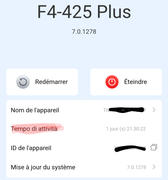
Also 1 thing in the french version of TNAS Mobile, there is an italian word instead of "Temps d'activité" in french :

Image