Page 5 of 7
Re: TOS 7.0.1188 (x86) Official Release Update
Posted: 11 Sep 2026, 16:33
by CursaYang
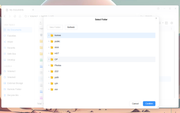
Normally, the homes and public folders are pinned to the front, and any folders created afterwards are sorted alphabetically in A-Z, then a-z order. Could you provide some screenshots to illustrate this?
Re: TOS 7.0.1188 (x86) Official Release Update
Posted: 11 Sep 2026, 21:16
by sianderson
both units updated fine, although the VMs app on one of them started but then failed to show me the VM's, rebooted the nas again and showed the VM's app disabled, re-enabled the app and VM's then visible and auto started
only happened to one of the NAS's so not entirely sure its the update itself but just highlighting it wasnt a smooth update as others have been
Re: TOS 7.0.1188 (x86) Official Release Update
Posted: 12 Sep 2026, 13:01
by nitzer71
CursaYang wrote: ↑11 Sep 2026, 16:33
Normally, the homes and public folders are pinned to the front, and any folders created afterwards are sorted alphabetically in A-Z, then a-z order. Could you provide some screenshots to illustrate this?
Thank you. Yes, I understand what you are describing — homes and public should be pinned at the top, followed by the other folders sorted alphabetically A–Z and then a–z.
However, this is not what I am seeing in the Copy/Move destination selector.
The problem is specifically with the folder list displayed after selecting Copy or Move in File Manager. In that window, folders that I create later appear at the bottom of the list rather than being inserted into their alphabetical position.
For example, if the existing folders are:
Documents
Movies
Photos
and I subsequently create a folder called Downloads, I would expect:
Documents
Downloads
Movies
Photos
Instead, Downloads appears at the bottom:
Documents
Movies
Photos
Downloads
This is why I believe the Copy/Move destination selector may not be applying the same alphabetical sorting as the normal File Manager view.
Re: TOS 7.0.1188 (x86) Official Release Update
Posted: 12 Sep 2026, 14:46
by Phil
sianderson wrote: ↑11 Sep 2026, 21:16
both units updated fine, although the VMs app on one of them started but then failed to show me the VM's, rebooted the nas again and showed the VM's app disabled, re-enabled the app and VM's then visible and auto started
only happened to one of the NAS's so not entirely sure its the update itself but just highlighting it wasnt a smooth update as others have been
Thank you for your feedback! Our laboratory has reproduced this issue, and it will be optimized and resolved in a future version. Please stay tuned for upcoming updates.
Re: TOS 7.0.1188 (x86) Official Release Update
Posted: 13 Sep 2026, 02:20
by Alak
A noter tout de même qu'il est très pénalisant, pour les français, de ne pas avoir intégré dans les version de Mariadb/Phpmyadmin, les patch de langues. Le bilan est là : lorsqu'on lance PHPmyAdmin depuis TOS et que l'on choisit le français à la connexion de la base MariaDb, nous obtenons une erreur systématiquement et il faut bidouiller pour désactiver l'option "français" de PHPmyAdmin afin de se connecter sans erreur et à coup sûr (avec une interface en Anglais, évidemment).
Notez que Synology et Qnap font nettement mieux et que tout est accessible en français, sans aucune erreur... Pour ma part, ce n'est pas trop pénalisant car ma principale base de données est sur un QNAP. Mais le processeur de mon F4-424 étant un peu plus performant que celui installé sur mon qnap TS-264, j'ai voulu voir ce que cela donnait sur le Terramaster. J'ai très vite renoncé au regard des erreurs rencontrées en langue française.
Même si je maitrise l'anglais, il est extrêmement plus confortable de gérer les bases dans ma langue natale... Je suppose que toutes les personnes qui ne sont pas anglaises doivent également trouver cela handicapant.
Cela a peu de rapport avec le TOS 7, mais je tenais quand même à vous le signaler. vu que les deux applications que j'ai tenté d'installer sont officiellement estampillées "terramaster", c'est que vous avez travaillé à l'intégration.
Le monde ne se réduit pas aux anglophones...
Re: TOS 7.0.1188 (x86) Official Release Update
Posted: 13 Sep 2026, 09:34
by Phil
Alak wrote: ↑13 Sep 2026, 02:20
A noter tout de même qu'il est très pénalisant, pour les français, de ne pas avoir intégré dans les version de Mariadb/Phpmyadmin, les patch de langues. Le bilan est là : lorsqu'on lance PHPmyAdmin depuis TOS et que l'on choisit le français à la connexion de la base MariaDb, nous obtenons une erreur systématiquement et il faut bidouiller pour désactiver l'option "français" de PHPmyAdmin afin de se connecter sans erreur et à coup sûr (avec une interface en Anglais, évidemment).
Notez que Synology et Qnap font nettement mieux et que tout est accessible en français, sans aucune erreur... Pour ma part, ce n'est pas trop pénalisant car ma principale base de données est sur un QNAP. Mais le processeur de mon F4-424 étant un peu plus performant que celui installé sur mon qnap TS-264, j'ai voulu voir ce que cela donnait sur le Terramaster. J'ai très vite renoncé au regard des erreurs rencontrées en langue française.
Même si je maitrise l'anglais, il est extrêmement plus confortable de gérer les bases dans ma langue natale... Je suppose que toutes les personnes qui ne sont pas anglaises doivent également trouver cela handicapant.
Cela a peu de rapport avec le TOS 7, mais je tenais quand même à vous le signaler. vu que les deux applications que j'ai tenté d'installer sont officiellement estampillées "terramaster", c'est que vous avez travaillé à l'intégration.
Le monde ne se réduit pas aux anglophones...
Merci pour votre retour !
Nous allons tester votre problème en environnement de test. S'il se reproduit, nous le transmettrons à notre équipe produit, qui évaluera et optimisera la solution dans une version ultérieure.
Re: TOS 7.0.1188 (x86) Official Release Update
Posted: 14 Sep 2026, 09:12
by CursaYang
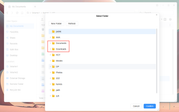
Following the example you gave, we created three folders — Documents, Movies, and Photos — and then created Downloads. As you can see in the image, in the folder list that appears after selecting "Copy" or "Move" in File Manager, Downloads appears after Documents.
If you can reproduce this issue consistently, please visit the link below and schedule a time with our online support team for remote troubleshooting:
https://salesiq.zohopublic.com/signatur ... 97d0be8892
Re: TOS 7.0.1188 (x86) Official Release Update
Posted: 14 Sep 2026, 16:03
by nitzer71
CursaYang wrote: ↑14 Sep 2026, 09:12
Following the example you gave, we created three folders — Documents, Movies, and Photos — and then created Downloads. As you can see in the image, in the folder list that appears after selecting "Copy" or "Move" in File Manager, Downloads appears after Documents.
If you can reproduce this issue consistently, please visit the link below and schedule a time with our online support team for remote troubleshooting:
https://salesiq.zohopublic.com/signatur ... 97d0be8892
I have noticed that the same operation in the TNAS Mobile File Manager works exactly as expected — the destination folders are displayed in normal alphabetical order.
This makes me wonder why the TOS 7 Web File Manager's Copy/Move destination selector does not use the same sorting behaviour. Since the mobile application already handles this correctly, could the Web File Manager use the same approach for consistency?
Re: TOS 7.0.1188 (x86) Official Release Update
Posted: 14 Sep 2026, 16:06
by CursaYang
In our internal testing, the sorting works correctly — you can refer to the screenshot I sent. If you can reproduce this issue consistently, please visit the link below and schedule a time with our online support team for remote troubleshooting:
https://salesiq.zohopublic.com/signatur ... 97d0be8892
Re: TOS 7.0.1188 (x86) Official Release Update
Posted: 14 Sep 2026, 16:33
by nitzer71
CursaYang wrote: ↑14 Sep 2026, 16:06
In our internal testing, the sorting works correctly — you can refer to the screenshot I sent. If you can reproduce this issue consistently, please visit the link below and schedule a time with our online support team for remote troubleshooting:
https://salesiq.zohopublic.com/signatur ... 97d0be8892
Thank you. I do wonder whether the test performed is actually reproducing the exact sequence I described.
The important point is not simply creating Documents, Movies, Photos and then Downloads and checking the order. The issue occurs when a new folder is created and then subsequently the Copy/Move destination selector is opened, where the newly created folder appears at the bottom rather than being inserted into the existing alphabetical list.
Since the TNAS Mobile File Manager does not exhibit this behaviour, I wonder whether the Web File Manager's Copy/Move selector is handling the folder list differently or retaining the previous folder order.
I would appreciate it if the development team could review this aspect of the Web File Manager rather than assuming that the internal test demonstrates that there is no issue.