[Help] Hardware transcoding Jellyfin TOS7

Discussion on Jellyfin media server, clients
Post Reply
User avatar
MessedUp
Posts: 4
Joined: 14 Oct 2026, 17:03
Germany

[Help] Hardware transcoding Jellyfin TOS7

Post by MessedUp »

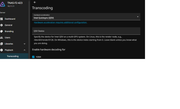
When is Terramaster going to support HW transcoding on TOS7 for their native Jellyfin app?

It is impossible to use the Intel Quicksync (default in Terramaster's Jellyfin app) on F2-423 and similar.

Thanks,
M
Image
User avatar
EriChan
TM Support
Posts: 425
Joined: 06 Jan 2026, 12:27
China

Re: [Help] Hardware transcoding Jellyfin TOS7

Post by EriChan »

MessedUp wrote: ↑14 Oct 2026, 17:26
Hardware transcoding is indeed supported on TOS 7 for the native Jellyfin app, and the configuration shown in your screenshot reflects the system's default state.

Please note that not all video playbacks require hardware decoding. If the client player supports Direct Play for the video codec and container, the stream is delivered directly without engaging the GPU.You can verify and troubleshoot the setup with the following steps:

1.Verify transcoding during playback:
  • Play a video and manually lower the resolution or playback bitrate in the client player to force transcoding.
  • Monitor your NAS CPU usage. If hardware acceleration is active, CPU utilization will remain low; if CPU software transcoding is being used, CPU usage will spike significantly.
2.Switch to VAAPI as an alternative:
  • If Intel QuickSync (QSV) is unstable or fails to engage properly, you can switch Hardware acceleration to Video Acceleration API (VAAPI).
  • In the VA API Device field, enter: /dev/dri/renderD128.
  • Save the settings.
  • Play a video, lower the bitrate, and observe whether CPU usage remains low to confirm hardware acceleration is functioning.
Hope this helps!
To contact our team, please send email to following addresses, remember to replace (at) with @

Technical team: support(at)terra-master.com(for technical support)
Service team: service(at)terra-master.com(for purchasing, return, replacement, RMA service)
User avatar
MessedUp
Posts: 4
Joined: 14 Oct 2026, 17:03
Germany

Re: [Help] Hardware transcoding Jellyfin TOS7

Post by MessedUp »

Hi EriChan,
Thank you for the detailed troubleshooting steps and for clarifying the situation with TOS 7!
Following your suggestion, I disabled Intel QuickSync (QSV) and switched the Hardware Acceleration engine over to VAAPI, explicitly mapping the VA API Device path to /dev/dri/renderD128.
I can report mixed results from this test:
1. The Good News: For a raw home video file encoded in an older camcorder format (dvvideo), the workaround worked perfectly. Jellyfin successfully engaged the hardware encoder at over 540fps while my NAS CPU usage sat at a comfortable 1%.
2. The Problem: When trying to play older cinematic .avi files (specifically legacy mpeg4 / Xvid / DX50 video streams with non-standard layout dimensions), the video engine instantly crashes on both smart TVs and mobile clients.
Looking closely at the generated transcode logs for these failing files, the underlying ffmpeg stream throws the following explicit error:
[h264_vaapi] Query format failed for 'Pars_hwupload_1': Invalid argument
[vf#0:0] Error reinitializing filters!
It appears that while the raw /dev/dri hardware path is accessible via VAAPI, the native application's sandbox environment lacks the necessary graphic filter libraries or scaling drivers to successfully upload and parse legacy video geometries into the Intel silicon memory without crashing the entire streaming thread.
Since many home media collectors have historical .avi or MPEG4 libraries alongside modern files, what is the official recommendation for resolving this filter initialization crash within the native app? Is there a plan to update the native package's bundled ffmpeg environment to better support these legacy media geometries under TOS 7, or is migrating to a Docker Compose deployment the only way to achieve global hardware transcoding stability on the F2-423?
Thanks again for your help,M
User avatar
TMnight
TM Support
Posts: 203
Joined: 30 Sep 2022, 16:40

Re: [Help] Hardware transcoding Jellyfin TOS7

Post by TMnight »

MessedUp wrote: ↑15 Oct 2026, 01:07
To further investigate the issue with older AVI video files causing the video engine to crash when VAAPI hardware-accelerated transcoding is enabled, would you be willing to send us the relevant AVI files that trigger the crash to our technical support email address: support(at)terra-master.com?

If you are unable to share the original videos, you can also provide a non-sensitive test file that reproduces the issue.

Once we receive the file, we will analyze it and attempt to reproduce the issue to investigate the root cause further.
To contact our team, please send email to following addresses, remember to replace (at) with @:
Technical team: support(at)terra-master.com(for technical support)
Service team: service(at)terra-master.com(for purchasing, return, replacement, RMA service)
User avatar
MessedUp
Posts: 4
Joined: 14 Oct 2026, 17:03
Germany

Re: [Help] Hardware transcoding Jellyfin TOS7

Post by MessedUp »

Hi TMnight,

Thank you for looking into this. I prefer not to share personal media files over email, but I can provide the exact technical specifications and the precise FFmpeg error blocks from my logs. This data should allow your development team to replicate the bug instantly using any legacy test file.

The issue occurs explicitly on an F2-423 running TOS 7, using the native App Center Jellyfin package routed via VAAPI (`/dev/dri/renderD128`).

#### 1. The Target File Profiles (The Input)
The crash triggers on legacy container structures featuring non-standard resolutions and ancient codecs. For example, two files that consistently cause an immediate video engine failure are:

* **File A Profiles:**
* **Container/Format:** .avi
* **Video Codec:** mpeg4 (Codec Tag: DX50 / Xvid)
* **Geometry:** 608x336 (Aspect Ratio 38:21), 25 fps
* **Audio Codec:** ac3 (5.1 surround, 48000 Hz)

* **File B Profiles:**
* **Container/Format:** .avi
* **Video Codec:** mpeg4 (Codec Tag: XVID)
* **Geometry:** 592x320 (Aspect Ratio 1.85:1), 25 fps
* **Audio Codec:** mp3 (Stereo, 48000 Hz)

#### 2. The Native App Command String Execution
When a webOS or Android client requests these streams, the native app's bundled system pipeline attempts to initialize the scale filter and hardware upload using the following command structure:

/usr/local/jellyfin/bin/ffmpeg -analyzeduration 200M -probesize 1G -f avi -init_hw_device vaapi=va:,vendor_id=0x8086,driver=iHD -init_hw_device qsv=qs@va -filter_hw_device qs -i file:"[INPUT_PATH].avi" ... -vf "setparams=color_primaries=bt709:color_trc=bt709:colorspace=bt709,scale=trunc(min(max(iw\,ih*a)\,min(608\,336*a))/2)*2:trunc(min(max(iw/a\,ih)\,min(608/a\,336))/2)*2,format=yuv420p" -codec:a:0 libfdk_aac ...

#### 3. The Structural Driver Crash (The Hard Data)
While the Intel driver successfully initializes the hardware interface wrapper (`va_openDriver() returns 0`), the execution fails the exact millisecond the filter chain attempts to parse the non-standard video frame blocks into the Intel silicon memory space. The log throws these explicit errors:

[h264_vaapi @ 0x55e4735ec200] Query format failed for 'Pars_hwupload_1': Invalid argument
[vf#0:0 @ 0x55e4738df880] Error reinitializing filters!
[vf#0:0 @ 0x55e4738df880] Task finished with error code: -38 (Function not implemented)
Conversion failed!

#### 4. The Diagnostic Conclusion
The error "Task finished with error code: -38 (Function not implemented)" indicates that the native app’s sandboxed container layer on TOS 7 is missing the underlying graphic filter translation maps or rendering libraries required to map legacy scaling matrix calculations (`Pars_hwupload_1`) directly onto the Jasper Lake graphics memory pipeline.

Your technical team should be able to reproduce this easily by running a standard mpeg4 .avi clip through the native package's environment using a non-standard aspect ratio.

Is there an upcoming maintenance patch scheduled for the native application's isolation layer configuration files to expose these missing driver filter capabilities natively to the containerized environment, or will the native ffmpeg path remain constrained to standard modern geometries?

Best regards,
MessedUp
User avatar
MessedUp
Posts: 4
Joined: 14 Oct 2026, 17:03
Germany

Re: [Help] Hardware transcoding Jellyfin TOS7

Post by MessedUp »

P.S. As an update for your technical team, I have also confirmed the system's exact automatic fallback behavior during these crashes.

When attempting to play an affected legacy file on the native LG webOS Jellyfin client app, the movie will successfully initialize and play, but the TOS 7 Resource Monitor shows a massive CPU utilization spike reaching 52% (while memory remains completely flat at 5%).

This spike confirms that the software successfully recognizes the client player's format limitations and attempts to utilize VAAPI hardware acceleration. However, because the hardware filter engine instantly drops with the error code -38 (Function not implemented), Jellyfin is forced to fall back entirely onto CPU software transcoding to preserve playback.

This further establishes that the application pipeline is functional, but is hitting a hard block at the OS driver/sandbox interface layer when mapping these legacy geometries onto the GPU.
User avatar
CursaYang
TM Support
Posts: 995
Joined: 06 Jan 2025, 16:34
China

Re: [Help] Hardware transcoding Jellyfin TOS7

Post by CursaYang »

Hello, thank you for providing the detailed logs and test results. The issue may be related to FFmpeg filter processing or VAAPI hardware acceleration compatibility with certain video formats.

To help us investigate further, please provide the complete FFmpeg command and logs for an affected video. Also, please test both software transcoding and VAAPI hardware transcoding to determine whether software transcoding works correctly. Based on the results, we will further investigate the transcoding pipeline in the native Jellyfin application.
To contact our team, please send email to following addresses, remember to replace (at) with @

Technical team: support(at)terra-master.com(for technical support)
Service team: service(at)terra-master.com(for purchasing, return, replacement, RMA service)
Post Reply

Return to “Jellyfin Media Server”